Back in the old days, we were limited to The Sims Homecrafter in order to make new wall and floor patterns. Admittedly, it did a lot; it could crop and scale images to fit the space and it also had a rudimentary anti-aliasing feature to smooth out sharpness. However, compatibility with modern operating systems is spotty and requires you in most cases to chase down problems, if it will launch at all.
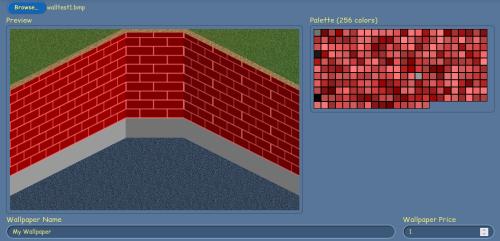
SneakySims has re-envisioned HomeCrafter as a pair of browser-based tools; one for walls, the other for floors. Though it won't do any anti-aliasing, it will quantise an image into a 256-colour bitmap automatically. The procedure for making a source image is the same as HomeCrafter— using a graphics editor of some sort (such as Krita, GIMP, Photoshop, Powerpoint, or even MS Paint or KolourPaint), create an image in BMP format that is 128 pixels wide and 256 pixels high. It can be larger than this, but it'll get scaled to 128x256 later anyway. If you're not feeling particularly creative, try taking a photograph or just nick something from the internet. Don't use generative AI, of course, because it sucks, but do anything else, up to and including ripping a wall down and scanning it with a desktop scanner.
The same for floor patterns, except a 128-px square is what we're looking for here. SneakySims' tool allows you to adjust the footstep sound, just like HomeCrafter. "Hard" is good for stone and metal, "Medium" for wood and linoleum, and "Soft" for carpet and anything else.