In this day and age of games as a service, whose assets are actually just on the company's servers and get streamed to you when you log into your game launcher, or are encrypted and locked within a folder that you can't open, the idea of modifying a game is almost totally foreign to some people. Maxis' entire modus operandi with their later games was making user-customisation as easy as possible. While other developers wasted time creating proprietary versions of common filetypes, Maxis just used bitmaps and MP3s. Where proprietary files were necessary, as in the case of wall and floor textures in The Sims, they supplied the necessary tools themselves. Electronic Arts did have an objection to letting users make their own furnishing objects (probably for some reason relating to content control), so tool programmer, Don Hopkins, took a vacation and released the Sims Transmogrifier on his own website, under his own name.
The tools I use to make stuff for The Sims are all basically the same ones that we've been using since antiquity: Homecrafter for wall and floor textures, Transmogrifier for furnishings, and an outlier called The Sims Creator which was supposed to supplant SimShow for making body and head skins. There's also The Sims Art Studio, which is used to make wall art out of bitmaps and JPEGs; Make-a-Date and Make-a-Celebrity, for creating non-player characters; and FaceLift, which is really quite useless (not like I haven't tried to make it work, it just doesn't).
While I won't make a tutorial out of this post, I will say that The Sims Creator was simultaneously a blessing and a curse when it was released alongside The Sims Deluxe back in 2002. On one hand, it allowed kids like me the opportunity to actually make skins without needing to spend $400 on Photoshop and $90 learning to operate it. On the other, it totally destroyed the market for 3rd-party skins. Why waste time with SimShow when you can treat your meshes like paper-dolls and paint right on the meshes in realtime? Furthermore, the absolute glut of slipshod-quality skins using Creator templates oversaturated the old web with the sorriest excuse for predefined game mods you could possibly imagine. As time has worn on, people who still carry the mantle of Sims 1 CC have learned how to use both Creator and SimShow in tandem, or have discovered how to get SimShow-like results out of Creator. Obviously, meshers still use SimShow, because you can't hot-swap new data into Creator—you have to actually shut the program off and restart it, where SimShow has that tasty little "Reload" button right there in the main UI. But, dedicated skinners like me generally have no need for SimShow anymore. It's easy to make garment primitives and equally easy to just paint the design you want to make right onto your meshes.
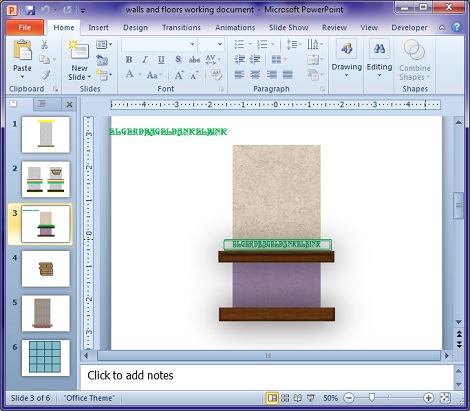
There's still no substitute for Homecrafter in the wall and floor department, though. In fact, there is no substitute—no one ever bothered to make one. The fact is, it does the job of stretching and skewing and scaling a predefined image onto the wall and the floor easier than it needs to be. It's not a very precise process, but it works well enough for us to have used it since 2000 without much complaining. Serious designers can figure out its quirks with a little trial-and-error and can design around them. While you can use any image editor to prepare a bitmap for Homecrafter (well, maybe not GIMP), I like to use Microsoft Powerpoint. In fact, I do most of my graphic design in Powerpoint; it has more powerful text and shape manipulation options than $5000 worth of design software. I've been using Powerpoint to make walls since at least 2006 when I started exploring what else it could do apart from make slideshows for social-studies class. An aside—at the risk of sounding self-aggrandising, the Powerpoints I made for school were really, really good. If Powerpoint was involved in an assignment, I knew that was an easy A. It turned out that I could stack textured rectangles to simulate the appearance of stuff like wood-grain panelling, vinyl siding, cement belting, and stucco which I could put into The Sims 2 as wall textures. As you can see from the picture at the right, you can also use a tileable wood texture and some zero-filled, thick-lined rectangles to make hardwood flooring (you can't see it very well, but it's there). More visible is the fact that you can use a swashy font to simulate a vine-looking adhesive decal to put above the chair rail, just like it was in my mum's old office complex. Also, using 3D shading and shadows, it's possible to make the walls look more 3D than a 2D image has any right to look. Well, as far as Powerpoint is concerned, that chair rail and skirting board are 3D objects, but it's all 2D to MS Paint, which is what I use to render everything into a single 128x256 24-bit bitmap.
The only place I tend to run into problems is when I use GIMP to recolour skins. The Sims is incredibly particular about filesizes, and skins can only be 1 of 2 sizes: 65kb or 192kb. If it's any other size, it either distorts or doesn't appear at all. GIMP isn't very good at indexing colours and the bitmaps it creates just can't be made compatible with The Sims under any circumstances. I do have a workflow for getting around this problem, but using GIMP instead of Photoshop makes a 1-step process into 8. But, that's just the way of today, I guess. Industry-standard tools cost loads of money, so you have to spend half your life working around shit when you're poor. That's pretty much the reason why I don't make furnishings for The Sims 2 anymore; it could take me 4 hours to do something as simple as change the shape of the legs on a table because I can't be arsed to learn how to use Blender (which, admittedly, costs nothing).
--17 August 2024--