Well, it's been since December, but I'm back on my Sims Classic shit again. I spent about an hour yesterday making a recolour of the cheap wood door that I could use in restrooms on downtown lots, because there's a serious lack of useful objects there, unless you want to waste space with 2 gender-segregated restrooms.
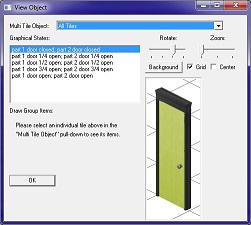
Unfortunately, the colour I selected for the door, while originally supposed to suggest particleboard with an adhesive veneer applied, ended up looking complete shite. But, it was a really easy process to get here, to the point where I can do it again and again if necessary to make doors in a wide variety of finishes. I was concerned that I would have to find a woodgrain texture online and scale it to the sprite, but it turns out that the 2D artists who used to work for Maxis in the 1997-1999 period of time were way better at their jobs than the current lot working for the EA Games studio called "Maxis". The doorjamb, the door, and the hardware are all separate sprites, meaning that there's no complex selecting that needs to go on in order to exclude certain elements from being recoloured. At that point, it's just a simple matter of using the Fuzzy Select tool in GIMP to grab the void colour, inverting the selection so the visible sprite is selected, and choosing a colour from the Colouriser. The door was a little more complex, but not much. When I was worried about woodgrain textures (which I can still do if I want to), I forgot that the Healing Brush was a thing that exists, and I was able to obliterate the dadoes without much bother, leaving me with a big ol' slab of wood for a door. So, it'll be easy to go back into Transmogrifier, clone up another door, and repeat the process without using that puke green colour. I could probably do the same thing for other doors, though I imagine a lot of the expansion pack ones don't have discrete sprites for their doorknobs and stuff.
Recolours are pretty easy once you know some basics about whatever program you're using; specifically what the tool is called that lets you select entire regions based on colour, the options that let you change from an indexed mode to RGB, and the one that lets you recolour selected regions. In GIMP's case, that's Image/Mode..., Fuzzy Select, and Colours/Colouriser. Also, I'm sure there's an analogue to this in Photoshop and whatever other tool, but GIMP has a sort of magnetic lasso that lets you define a custom selection in exactly the same manner as drawing a polygon on Google Earth or making a custom shape in Powerpoint. We wished we had these tools back at the millennium (not that I would have been able to understand how they worked, being 9 and all).
Also, as a completely incidental thing, I discovered where the game keeps its lot descriptions earlier today. Rather than storing them in the IFF file, like you'd think it would, it actually puts them in the Export folder in the lot's SRF file. If you wanted to, you could edit the file to hack in a lot type flag, but I'm not sure if it would work properly as that lot type, especially since lot types have their own discrete file extension. Residential lots are *.RDL, downtown lots are *.DTL, Old Town community lots are *.CMT, that sort of thing. In all likelihood, it would just kick you out to Lot 11 until you can reset the flag.
--15 August 2024--