I think at some point I should make a proper series about how to mod The Sims Classic. Really, I need to make a whole new CC site for it. It's only $60 to do this for a whole year on Neocities... but, I suppose, if I had $60, I wouldn't be e-begging on Tumblr and Cohost to afford a new office chair.
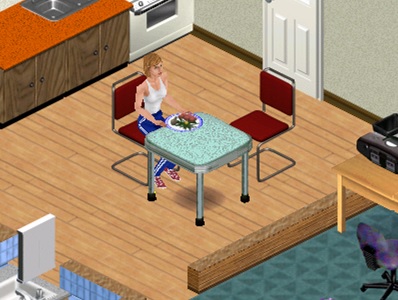
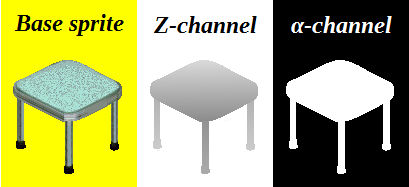
Anyway, I discovered how to make new object shapes in The Sims Classic using GIMP's gradient tool yesterday. A little-used function of Transmogrifier is its ability to export the channel masks along with the sprite image; most people just let Transmogrifier generate the masks for them, which is really imprecise and can lead to bad layering in the game. But, you can make your own channel masks with relatively little bother and not need to hope that the tool is able to divine your intent. The base sprite is what shows up in your sim's house, the alpha channel defines the sprite's shape, and the z-channel sets layering priority, allowing your object to interact more naturally with the other objects in the room. That's the bit that tended to get left out of old-web Sims 1 CC a lot, which, when combined with the wrong priority setting in Transmogrifier, could lead to unnatural layering—such as a digital alarm clock set on a nightstand that improperly layers over a sim standing in front of it, or a set of paintbrushes on a towel that layers underneath the table it's supposed to be sitting on.
While I'm not going to make this blog entry into a tutorial; basically, you can use the base sprite to make the masks through the use of only the Fuzzy Select, Brush, and Gradient tools. All you really need to worry about is sampling the precise grey tones that the z-channel mask uses and align the gradient so the darkest grey is at the top. Unfortunately, this procedure exposes a severe failing of GIMP's ability to index bitmaps, which you'll also discover when making skins.
I don't know why this works, and by all accounts it doesn't make sense, but I can't just save a bitmap in GIMP and have it work in The Sims. I have to do all my work, index the colours, select the whole image, copy it into MS Paint, take a screenshot of Paint with the image in it, make a new Paint file and paste the screenshot into it, crop out everything except the sprite image, and save it as a 24-bit bitmap. If I don't follow that procedure exactly, then none of my recolours work in the game. Of course, I'm a walking statistical anomaly for whom a 2-step process requires 8 steps, so it's probably just a fluke. I imagine it's got something to do with colourspace, but I don't know enough about how GIMP and Paint work under the bonnet to know precisely what's going on here.
But, anyway, now that I've cracked the code as it were, I can make more interesting furnishings for The Sims and even correct mistakes I made back in the turn of the last decade. Like, the armchair I made to round out the stock game's "Contempto for the Home" collection; I can't put it against walls, because it clips through them at certain angles. All I would need to do there is give it a new z-channel and we'd be in business. And, the Atari 2600 I made in 2010 has to be set on the floor, because it layers underneath surfaces. All this and more can be done with GIMP's gradient fill tool.