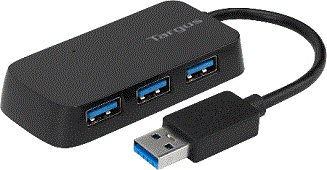
First, let's cover the biggest bit of computers: USB devices. The USB standard is even used to a certain degree on smart devices, but they get taken to an absurdist extreme on the PC. Literally everything of practical use these days connects to the PC through a flat USB port. That flat bit that goes into your device charger can also be plugged into a PC for file transfer between your device and your PC. The technical name for this is "USB type A". At the other end of the cord is either a USB type C connector (if you use an Android device) or an Apple Lightning connector (iOS).
If you have an Android device, try plugging your USB-A connector into your PC instead of the power outlet and see what happens (though, you might have to tell your device that you're trying to connect to a PC; a prompt should come up on your homescreen).
An aside, what does USB stand for? Universal serial bus. You don't need to remember that for any reason, though.
The biggest thing we use USB for is file storage. Those little USB sticks they sell at Office Depot expand the storage capability of your PC's hard disk (main storage unit) by anywhere from 8 to 512 Gigabytes. These are called "flash drives" because they use a memory chip called "flash memory" (SD cards do the same thing). They can also be called "thumb drives" because they're the size of your thumb. Or "USB drives" if you're an ageing computer science professor.
We also use USB ports for keyboards, mice, MIDI controllers, detachable webcams, drawing tablets, or really anything at all.
To use a flash drive, all you have to do is plug it into a free USB port on your PC. Older PCs have most of their ports in the back, but newer ones have at least 2 ports in the front for easier access. Typically, you won't need to do any more than this, because the computer's operating system is smart enough to know what a flash drive looks like and how it works.
In fact, a lot of USB devices don't need to be installed or formatted; especially the basic ones, like keyboards, mice, and USB hard disks. Specialised devices, like MIDI controllers and webcams, may need to install device drivers, which usually come either on an optical disc packed in with the device or from the manufacturer's website.